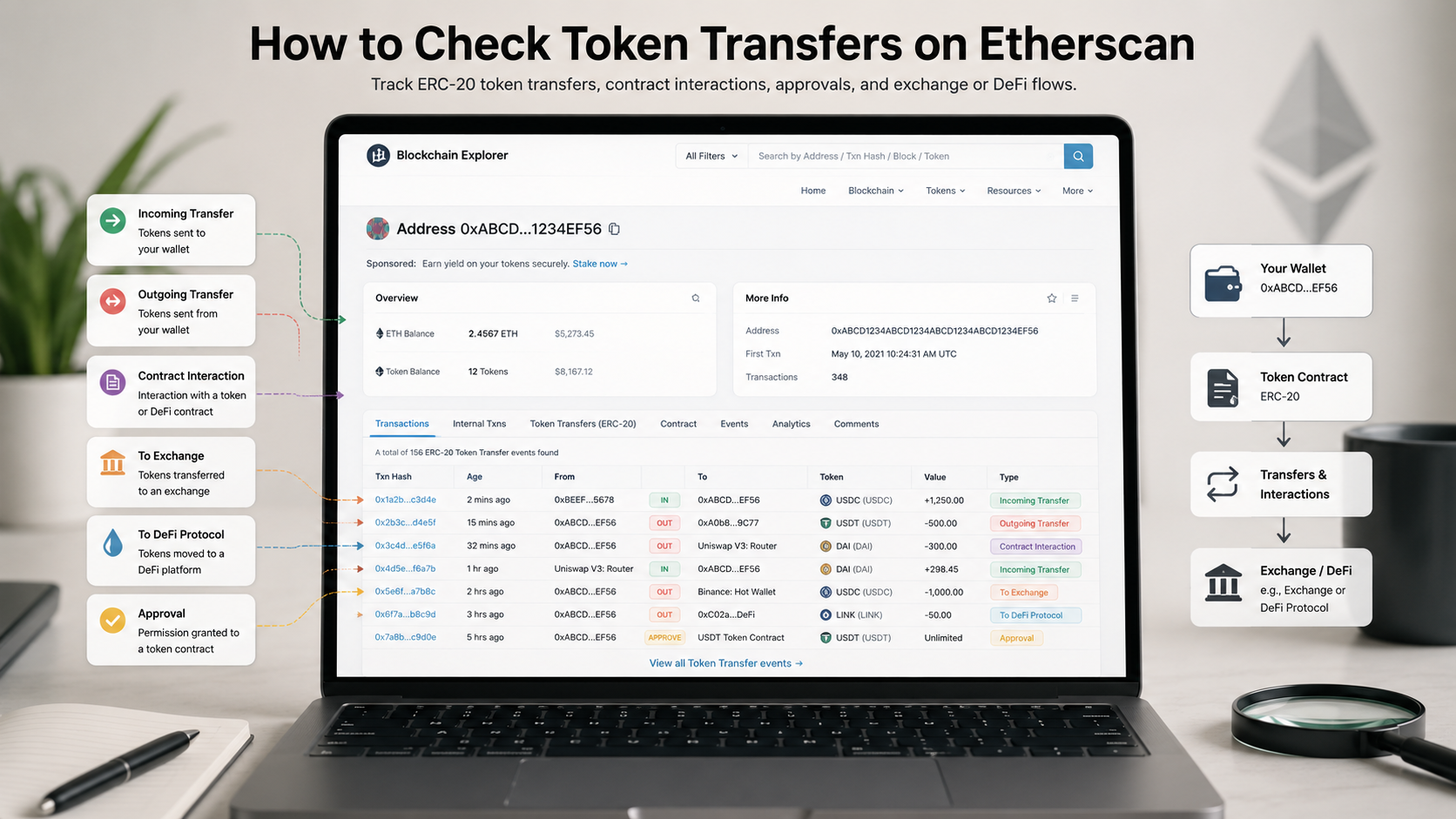
Learning how to check token transfers on Etherscan is one of the most practical skills in crypto research.
Most investors know how to paste a transaction hash into Etherscan. But fewer know how to read token transfers correctly, separate ERC-20 movements from native ETH transactions, identify suspicious token activity, or understand whether a wallet is actually moving value.
That gap matters.
A wallet may show little ETH movement but still have large token transfers. A transaction may look simple at first glance but include multiple contract interactions. A token may appear in a wallet history even if the user never bought it. A scam token may be sent to a wallet to create confusion or lure the user into interacting with a fake contract.
Etherscan is useful because it gives access to raw blockchain activity. But raw activity is not automatically insight.This is why learning how to check token transfers on Etherscan helps investors verify wallet behavior instead of relying on assumptions.
The goal is not only to see that a token moved.
The goal is to understand what moved, where it moved, and whether the movement matters.
Table of Contents
What Token Transfers on Etherscan Actually Show
Token transfers on Etherscan show movements of tokens such as ERC-20 assets between Ethereum addresses.
Etherscan provides a dedicated ERC-20 token transfers section and its API documentation explains that the ERC-20 transfer endpoint retrieves the list of ERC-20 token transfers made by a specified address, with optional filtering by token contract.
This is important because token transfers are different from normal ETH transfers.
On Ethereum, ETH is the native asset. ERC-20 tokens are smart contract-based assets. When tokens move, the transaction usually interacts with a token contract and emits transfer data.
So when analyzing a wallet, investors should check more than one tab:
| Etherscan Area | What It Shows | Why It Matters |
|---|---|---|
| Transactions | Native ETH transactions and contract calls | Shows top-level wallet actions |
| Internal Txns | Internal contract-driven transfers | Helps reveal hidden contract movements |
| Token Transfers | ERC-20 movements | Shows token-level activity |
| NFT Transfers | ERC-721 / ERC-1155 movements | Useful for NFT activity |
| Token Approvals | Spending permissions | Important for security risk |
If you only look at the “Transactions” tab, you may miss the actual token movement.
That is one of the most common mistakes.
Step 1: Search the Wallet Address or Transaction Hash
The first step is simple.
Go to Etherscan and paste either:
- A wallet address;
- A transaction hash;
- A token contract address;
- An ENS name if available.
Etherscan describes itself as an Ethereum blockchain explorer that allows users to search Ethereum transactions, addresses, tokens, prices and other blockchain activity.
If you are checking a wallet, start from the wallet address page.
If you are checking one specific event, start from the transaction hash.
A transaction hash is better when you want to verify a specific action.
A wallet address is better when you want to understand behavior over time.
For example:
- “Did this wallet receive USDC?”
- “Did this token transfer succeed?”
- “Which address sent the tokens?”
- “Did the wallet interact with a contract?”
- “Is this part of a repeated pattern?”
Those questions require different levels of analysis.
Step 2: Open the Token Transfers Tab
On an Etherscan wallet page, the Token Transfers tab is where token-level activity becomes visible.
This section can show:
- Token name;
- Token contract;
- Amount transferred;
- Sending address;
- Receiving address;
- Transaction hash;
- Timestamp;
- Token standard;
- Direction of the movement.
This helps answer a basic but important question:
Did the wallet actually receive or send the token?
For ERC-20 tokens, Etherscan also has a global token transfers page that lists ERC-20 token transactions on the Ethereum blockchain. It notes that zero-value token transactions are hidden by default unless users change site settings.
That detail matters because some suspicious or spam-related activity may not appear exactly the way beginners expect.
When reviewing token transfers, do not only read the token name. Token names can be copied.
Always check the contract address.
Step 3: Verify the Token Contract
This is one of the most important steps.
Scammers often create fake tokens with names similar to real assets. A wallet may receive a fake “USDT”, fake “UNI”, fake “AIRDROP”, or fake project token designed to make the user click a malicious link.
To avoid this, check:
- Contract address;
- Token symbol;
- Holders;
- Verified contract status;
- Token tracker page;
- Official project links;
- Whether the token has a blue checkmark or recognizable listing.
Etherscan’s token tracker page says it tracks key metrics of ERC-20 tokens and notes that only tokens with a Blue Checkmark are listed on that page.
A blue checkmark does not mean a token is risk-free, but it can help distinguish recognized tokens from obvious impersonations.
The key rule: Never trust a token name alone. Trust the contract address.
This is especially important when checking airdrops, unknown transfers, or wallet activity after interacting with a new dApp.
Step 4: Read the Direction of the Transfer
Once you find the token transfer, check the direction.
A transfer can be:
- Incoming;
- Outgoing;
- Wallet-to-wallet;
- Wallet-to-contract;
- Contract-to-wallet;
- Exchange-related;
- Bridge-related.
This changes interpretation.
An incoming transfer may mean the wallet received tokens. But it does not always mean the user wanted them. Spam tokens can be sent to public addresses without permission.
An outgoing transfer may mean the wallet sent tokens. But it could also happen because the user approved a contract earlier and the contract spent tokens later.
A contract-to-wallet transfer may be a reward, claim, swap output, staking withdrawal, or airdrop.
A wallet-to-contract transfer may be a swap, liquidity deposit, bridge, staking action, or approval-related movement.
The mistake is assuming every token transfer is a simple send.
In DeFi, token transfers often happen as part of larger contract interactions.
Step 5: Open the Transaction Details
After identifying a token transfer, open the transaction hash.
This gives more context.
Look for:
- Transaction status;
- From address;
- To address;
- Method;
- Token transfer events;
- Gas fee;
- Contract interaction;
- Internal transactions;
- Logs;
- Input data if needed.
The transaction page can show whether a transfer happened through a direct token transfer, a swap, a liquidity pool interaction, or a more complex smart contract call.
For example, a wallet may send USDC to a contract and receive another token back. In the Token Transfers tab, you may see both movements. But only the transaction page shows the full action.
This is why professional on-chain analysis often starts with the wallet page, then moves into transaction-level detail.
For a broader workflow, see BlockCodex’s guide “Blockchain Explorers: 7 Powerful Ways to Read On-Chain Data Like a Pro”.
Step 6: Compare Token Transfers with Token Approvals
Token transfers show what moved.
Token approvals show what could move later.
This distinction is critical.
Etherscan’s Token Approvals page lists contracts approved to spend an address’s tokens, and explains that the “at risk amount” shows what could be vulnerable if those contracts were hacked.
Why does this matter?
A wallet may not show any suspicious outgoing transfer yet, but it may have old approvals that still expose assets.
This happens when users interact with:
- DEXs;
- Bridges;
- Staking platforms;
- NFT marketplaces;
- Claim pages;
- Unknown dApps;
- Fake airdrop sites.
Checking transfers tells you what already happened.
Checking approvals helps identify future risk.
For security-focused analysis, both matter.
For deeper context, see BlockCodex’s article “Best Crypto Security Stack: 7 Practical Layers to Protect Digital Assets”.
Step 7: Watch for Spam and Scam Token Transfers
One of the most confusing parts of wallet analysis is receiving tokens you never requested.
This can happen because public wallet addresses are visible. Anyone can send tokens to any address.
Spam token transfers may be used to:
- Promote fake projects;
- Trick users into visiting malicious websites;
- Create fake airdrop claims;
- Impersonate real tokens;
- Lure users into approving malicious contracts.
Recent academic research on suspicious ERC-20 tokens found that transfer graph patterns can help distinguish suspicious contracts from legitimate ones, and reported an average 88.7% accuracy in a simple model identifying scam contracts based on transfer-graph characteristics.
The practical takeaway is simple: suspicious token behavior often leaves patterns, but users should still avoid interacting with unknown tokens.
If a random token appears in your wallet:
- Do not visit links in the token name;
- Do not try to sell it through unknown websites;
- Do not approve unknown contracts;
- Check the contract address;
- Search official sources before interacting;
- Ignore it if you cannot verify it.
A token transfer appearing in your wallet does not automatically mean value.
Sometimes it is bait.
Common Mistakes When Checking Token Transfers
Investors often make the same mistakes.
Mistake 1: Trusting the token name
Fake tokens can copy names and symbols.
Always verify the contract address.
Mistake 2: Ignoring contract interactions
A token transfer may be part of a swap, bridge, claim, or approval-related movement.
Open the transaction hash.
Mistake 3: Confusing receipt with ownership intent
A wallet can receive spam tokens without choosing to.
Incoming does not always mean meaningful.
Mistake 4: Ignoring approvals
A wallet can look safe while old approvals remain active.
Check approvals separately.
Mistake 5: Reading one transfer without wallet history
One transfer rarely explains behavior.
Look at patterns over time.
How Token Transfers Support Better On-Chain Analysis
Token transfer analysis is useful because it helps investors understand real wallet behavior.
It can help identify:
- Accumulation;
- Distribution;
- Exchange deposits;
- DeFi usage;
- Bridge activity;
- Airdrop claims;
- Token unlock movements;
- Whale transfers;
- Scam exposure;
- Suspicious wallet patterns.
But token transfers are most useful when combined with context.
For example:
| Question | What to Check |
|---|---|
| Is a wallet accumulating? | Repeated incoming transfers from exchanges |
| Is a wallet distributing? | Repeated outgoing transfers to exchanges |
| Is a token suspicious? | Contract address, holders, transfer patterns |
| Did a swap happen? | Transaction details and token transfer events |
| Is there security risk? | Token approvals and unknown contracts |
| Is activity meaningful? | Repeated behavior, not one isolated transfer |
For whale-related interpretation, see BlockCodex’s guide “How to Analyze Whale Activity: 7 On-Chain Signals Investors Should Track”
The goal is not to overreact to every movement.
The goal is to turn raw transfers into a structured interpretation.
Practical Checklist: How to Check Token Transfers on Etherscan
Before drawing conclusions, use this checklist:
- Search the wallet address or transaction hash;
- Open the Token Transfers tab;
- Verify the token contract address;
- Check whether the transfer is incoming or outgoing;
- Open the transaction hash for full context;
- Review related internal transactions if needed;
- Compare token movement with approvals;
- Check whether the token is recognized or suspicious;
- Look for repeated wallet behavior;
- Avoid interacting with unknown tokens.
This process is simple, but it prevents many errors.
The strongest on-chain analysts do not just read the data.
They verify what the data actually means.
Conclusion
Knowing how to check token transfers on Etherscan helps investors move beyond surface-level wallet analysis.
Token transfers show what assets moved, which addresses were involved, and how wallets interact with tokens and contracts. But they must be interpreted carefully.
A token transfer may be a normal send, a swap output, a reward claim, a bridge movement, a contract interaction, or spam. The token name may be misleading. The contract address matters. Approvals matter. Transaction context matters.
Etherscan gives investors the raw evidence. But investors still need a clear process to check token transfers on Etherscan before drawing conclusions from wallet activity.
The edge comes from reading that evidence correctly.
If you want to analyze crypto wallets more seriously, start with a simple habit:
Do not ask only, “Did a token move?”
Ask: Which token moved, through which contract, and why does that movement matter?
That is where real on-chain analysis begins.